
You can use the search bar to find the saved messages. Key in slash “/” , followed by the “saved” and enter.
Extra Tips! Press Ctrl + E to activate the search bar to enter any command.
Steps:
1. Press: Ctrl + E
2. Type: /saved
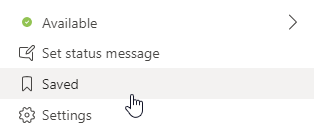
You an also access saved messages in the profile dropdown menu.

 Tech That Matters